How to Ace a Remote Job Interview: 12 Proven Virtual Interview Tips to Get Hired
You finally landed it: the interview invite for that remote role you’ve been eyeing. Then you read the fine print: “This interview will be conducted via Zoom.” Suddenly, the excitement mixes with a new kind of nervousness. No firm handshake, no reading the room in person, just you, a webcam, and a lot riding on your Wi-Fi connection. That’s where remote job interview tips can make the difference between an awkward video call and a confident, professional interview that moves you one step closer to a job offer.
Remote work isn’t a fringe arrangement anymore; it’s mainstream. Survey data from Pew Research shows that roughly three-quarters of U.S. workers whose jobs can be done remotely are now doing so at least part of the time, and SHRM reports that the vast majority of employers plan to keep relying on virtual interviews going forward. In other words, remote job interview tips aren’t a niche skill set anymore. They’re a core part of modern job hunting.
The good news? Acing a virtual interview isn’t about being naturally camera-friendly or owning expensive gear. It’s a learnable skill, built from a handful of habits you can pick up before your next call. Below are 12 proven virtual interview tips covering everything from research to follow-up, plus a pre-interview checklist you can bookmark and reuse for every remote job interview ahead.
Why Remote Job Interviews Require a Different Approach
In a traditional interview, a lot of the “soft” evaluation happens without either side thinking about it: a handshake, how you carry yourself walking into the room, small talk in the elevator. None of that exists in a remote job interview. Instead, the interviewer is quietly evaluating something else entirely: how comfortably you communicate and present yourself through a screen, because that’s exactly what your day-to-day would look like if they hire you.
This is the part candidates often miss. A video interview isn’t just an in-person interview relocated to a webcam; it’s a preview of your remote-work competence. Gallup’s workplace research has found that only about half of managers strongly trust their remote teams to be fully productive without direct oversight. That trust gap means every remote candidate is being screened, whether explicitly or not, for exactly the traits that close it: self-management, clear communication, and comfort working through digital tools rather than face-to-face conversation.
Once you understand that difference, these remote job interview tips stop feeling like arbitrary etiquette rules and start becoming practical strategies for making a stronger impression on employers.
12 Proven Virtual Interview Tips to Ace Your Remote Job Interview
1. Research the Company’s Remote-Work Culture, Not Just the Company
Standard interview research- company mission, products, recent news is still necessary, but for a remote job interview you need to go one layer deeper. Before the call, try to find out:
- Whether the role is fully remote, hybrid, or “remote-first” (there’s a meaningful difference between all three).
- What tools the company uses for communication and project management (Slack, Asana, Notion, etc.).
- Whether the team is distributed across time zones, and how they handle that.
- Any public info on their remote-work policies: check the careers page, Glassdoor, or LinkedIn posts from current employees.
Showing up with this context lets you ask sharper questions later and signals that you’ve thought seriously about what remote work actually looks like there, not just that you want to work from home.
2. Test Your Technology Before the Interview, Not During It
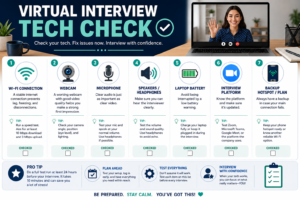
Nothing derails momentum faster than a frozen screen or a muted mic in the first two minutes. Do a full dry run at least a day in advance:
- Open the exact platform you’ll be using- Zoom, Microsoft Teams, Google Meet, or a proprietary hiring tool- and join a real test call.
- Check your camera, microphone, and speakers separately, not just “the app opened fine.”
- Confirm browser permissions are enabled if the interview runs through a browser rather than a desktop app.
- Charge your laptop fully, or keep it plugged in throughout the call.
- Have a backup plan ready: a phone hotspot, a different room, or a friend’s Wi-Fi in case your connection drops.
A five-minute test run the night before can save you from a genuinely stressful start.
3. Choose a Professional, Distraction-Free Interview Environment
Where you sit for your remote job interview says almost as much about your professionalism as what you say. Look for a spot that is:
- Quiet: away from roommates, kids, pets, or street noise.
- Well-lit: ideally with a light source in front of you, not behind you (a window at your back turns you into a silhouette).
- Tidy: a plain wall or neat bookshelf beats a cluttered background.
- Private: somewhere you won’t be interrupted mid-sentence.
If you genuinely can’t find a clean backdrop, a simple, subtle virtual background is a reasonable workaround; just avoid anything busy or cartoonish that pulls focus from your face.
4. Dress Professionally, Even From Home
It’s tempting to think “they’ll only see me from the waist up,” but treat your remote job interview like an in-person one. Dressing fully and appropriately does two things: it signals respect for the process, and it puts you in the right headspace so an unexpected moment, like standing up to grab a document, doesn’t turn awkward.
Match your outfit to the company’s general level of formality (a startup and a law firm won’t expect the same thing), and stick to solid, neutral colors; busy patterns and very bright or dark shades can distort strangely on camera.
5. Master Virtual Body Language and Eye Contact
This is one of the most counterintuitive virtual interview tips, and one of the most important. Your instinct is to look at the interviewer’s face on your screen, but actually to simulate eye contact on their end, you need to look directly into your camera lens while speaking. A simple trick: place a small sticky arrow near your camera as a reminder. It feels unnatural at first, but after a couple of practice sessions, it becomes second nature.
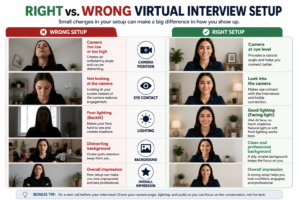
A few other adjustments matter here too:
- Prop your laptop up so the camera sits at eye level, not looking up your nose or down at your part.
- Sit upright but not rigid, and keep your hands visible; freezing completely reads as stiff or nervous.
- Nod and use small facial expressions to show active listening, since your usual in-person cues (leaning in, subtler gestures) are harder to read on a small screen.
- Smile when it’s genuine. It’s easy to forget on video, but it warms up the whole conversation.
6. Prepare Concise Answers to Common Interview Questions
You still need the fundamentals covered: “Tell me about yourself,” “Why do you want this role?” “Why should we hire you?” The difference for a remote job interview is pacing; rambling answers are harder to follow over video than in person, where body language fills in some of the gaps.
Prepare talking points rather than a memorized script for each of these, and practice trimming your answers down to the essential two or three points you want the interviewer to remember.
7. Use the STAR Method for Behavioral Questions
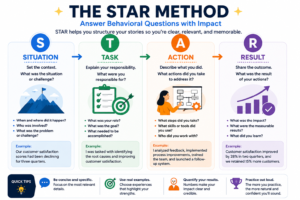
Behavioral questions- the ones that start with “Tell me about a time when…” or “Give me an example of…” are common in virtually every interview, remote or not. The STAR method gives you a simple structure to answer them clearly instead of rambling:
- Situation: briefly set the context (what was going on, where, when).
- Task: explain what you specifically were responsible for or needed to solve.
- Action: describe the concrete steps you took (this should be the bulk of your answer).
- Result: close with the outcome, ideally with a number or measurable impact.
For example, if asked about a time you managed a tight deadline: Situation: a client moved up a launch date by two weeks. Task: You had to reprioritize your team’s workload without dropping quality. Action: You restructured the project timeline, reassigned two tasks, and set up daily 15-minute check-ins. Result: The project shipped on time with no missed requirements.
A short, well-structured STAR answer is far more memorable than a vague, sprawling one, and it works especially well on video, where a tight structure keeps you from losing the interviewer’s attention.
8. Demonstrate That You Can Succeed Remotely
Of all the remote job interview tips on this list, this may be the most important because employers want evidence that you can actually succeed while working remotely. Employers hiring for remote roles are specifically screening for:
- Self-management: can you hit deadlines and stay productive without someone checking in?
- Written communication: can you express ideas clearly in Slack, email, or async updates?
- Proactive communication: do you raise issues early instead of waiting for someone to ask?
- Time management: can you juggle flexible hours or overlapping time zones effectively?
- Collaboration without proximity: how do you build trust with teammates you rarely, if ever, meet in person?
Have two or three specific stories ready (STAR-structured, ideally) that demonstrate these qualities directly; freelance work, remote internships, or even self-directed academic or volunteer projects all count if you’re newer to remote work.
9. Know How to Handle Technical Problems Professionally
Even with a perfect tech check, something can still glitch mid-interview: audio cutting out, video freezing, a dropped connection. What separates a strong remote candidate from a rattled one is how they handle it:
- Say something immediately if you notice an issue; don’t just talk into the void hoping it resolves itself.
- If the connection drops entirely, reconnect as quickly as possible and apologize briefly, without over-explaining.
- Agree on a backup communication method (like a phone number) at the start of the call if the platform seems unstable.
- If you need to switch devices, do it calmly and let the interviewer know what you’re doing.
Handling a glitch smoothly is, ironically, a live demonstration of exactly the remote-work composure employers are trying to assess.
10. Ask Smart Questions About the Role and Remote Workplace
When you get the classic “Do you have any questions for us?”, this is your moment to show you’ve thought seriously about what remote work actually looks like at this company. Strong questions to consider:
- How does the team stay connected day-to-day, mostly async, or a heavy meeting culture?
- What does onboarding look like for a remote hire?
- How is performance measured and reviewed for remote employees?
- How does the team handle overlapping working hours or time zones?
- If the role is hybrid, how many days are typically in-office, and is that flexible?
Try to avoid steering the conversation toward salary and benefits in this first exchange unless the interviewer brings it up; save that for later in the process.
11. Avoid Common Virtual Interview Mistakes
Even well-prepared candidates trip over a few recurring pitfalls. Watch out for:
- Checking another screen or tab during the call; interviewers notice eyes drifting sideways.
- Reading from a script instead of speaking naturally, which can sound stiff or rehearsed.
- Notifications popping up because you forgot to silence your phone or computer.
- Poor lighting that leaves your face dim or backlit.
- Logging in late, even by a couple of minutes.
- Interrupting due to connection lag; pause briefly before responding to avoid talking over the interviewer.
- Looking at yourself instead of the camera, which reads as distracted.
- A messy or distracting background that pulls focus from the conversation.
Most of these are easy to prevent with the prep work from tips one through nine; they just require a little intention.
12. Send a Thoughtful Follow-Up After the Interview
Within 24 hours of your remote job interview, send a short thank-you email. Reference something specific from the conversation rather than a generic note; it shows you were genuinely present, not just going through the motions. Briefly reinforce your interest in the role and, if it fits naturally, restate why your background makes you a strong match. If a minor technical hiccup happened during the call, it’s fine to acknowledge it lightly rather than ignore it; handling it with grace is itself a small proof point of remote-work readiness. Indeed’s guide to the STAR method (https://www.indeed.com/career-advice/interviewing/how-to-use-the-star-interview-response-technique) is a solid resource if you want to keep refining your behavioral answers even after this interview is done.
Common Remote Interview Questions to Prepare For
Beyond the standard “tell me about yourself” territory, remote interview questions tend to cluster around a few specific themes. It’s worth preparing at least one solid answer for each category:
| Category | Sample Question | What They’re Really Assessing |
|---|---|---|
| Self-management | “Walk me through your daily structure when working from home.” | Can you stay productive without supervision? |
| Communication | “How do you handle async handoffs with teammates?” | Can you communicate clearly in writing? |
| Collaboration | “How do you build trust with people you rarely meet in person?” | Can you form working relationships remotely? |
| Technical readiness | “What’s your backup plan if your internet fails?” | Are you prepared for the practical realities of remote work? |
| Time zones | “How do you coordinate with a team spread across time zones?” | Can you manage overlapping schedules effectively? |
| Motivation | “Why do you want a remote role specifically?” | Is your interest genuine, or purely about convenience? |
Preparing even brief, STAR-structured answers for each row here covers the vast majority of what a remote hiring panel is likely to ask.
Remote Interview Checklist: What to Check and When
Use this simple checklist in the lead-up to your call so nothing gets left to the last minute:
| Timing | What to Check |
|---|---|
| 24 hours before | Test your camera, mic, and internet connection on the actual platform; confirm the interview time and time zone; charge your laptop; plan your outfit; review your notes and STAR examples. |
| 30 minutes before | Close unnecessary tabs and apps; silence your phone completely; tidy your background; check your lighting; use the restroom and grab water. |
| 5 minutes before | Log into the call; do a final mic/camera check; take a few deep breaths; have your notes and questions within eyesight but out of frame. |
Bookmark this table; it works for every remote job interview you’ll do from here on out, not just this one.
Final Thoughts: Turning Remote Interview Prep Into a Job Offer
A remote job interview isn’t harder than an in-person one; it’s just different. It asks you to manage a few extra variables at once: your camera, your connection, your environment, and a slightly different kind of body language, all while proving you can actually thrive without someone checking in on you.
Put these remote job interview tips into action by researching the company, structuring your answers with the STAR method, demonstrating your remote-work habits, and following up thoughtfully. Put these 12 virtual interview tips into practice consistently, and you won’t just survive your next video call; you’ll walk out of it one step closer to getting hired.