
How to Optimize Your Resume for Applicant Tracking Systems (ATS)
You spent three hours perfecting that resume. You tailored the summary, agonized over bullet points, and hit “submit” with a little flicker of hope. Then… nothing. No rejection email. No interview. Just silence.
Here’s the uncomfortable truth: a human being may never have laid eyes on your resume. It’s very likely that a piece of software read it first and decided you weren’t a match before a recruiter ever got the chance to disagree.
That software is called an Applicant Tracking System, or ATS, and if you’re job hunting in 2026 without understanding how to optimize your resume for applicant tracking systems, you’re basically mailing your application into a black hole. This isn’t a scare tactic. It’s just how modern hiring works now, and once you know the rules, you can actually use them to your advantage.
Let’s break down exactly what an ATS is, why it matters, and how to build a resume that sails through the bots and lands in front of an actual human.
What Is an ATS and Why Resume Optimization for Applicant Tracking Systems Matters
An applicant tracking system is software that companies use to collect, sort, scan, and rank job applications before a recruiter ever opens them. Think of it as the bouncer standing at the door of every job you apply for, checking IDs before anyone gets inside.
Nearly every large employer now relies on this kind of software to manage the flood of applications they receive, and once your resume is submitted, the system extracts details like your contact information, work history, and skills, then slots you into a ranked or searchable list for the recruiter to work through later.
Here’s why that matters so much for your job search:
- The vast majority of large companies use some form of ATS to manage hiring, according to workforce guidance from the International Association of Workforce Professionals, which notes that these systems screen resumes, rank candidates, and manage the hiring process for most employers today.
- A large share of applicants are filtered out before a human ever reviews their resume.
- Recruiters often only look at the resumes the ATS ranks highest, meaning a poorly optimized resume can bury you no matter how qualified you actually are.
So when we talk about ATS resume optimization, we’re really talking about one thing: making sure the “bouncer” lets you through the door so a real person can judge you on your merits.
How ATS Resume Optimization Actually Works
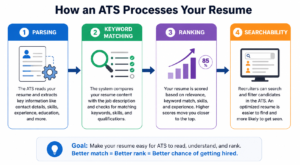
Before you can optimize your resume for applicant tracking systems, it helps to understand what’s happening behind the scenes when you hit “apply.”
Here’s the general flow:
- Parsing: The ATS scans your resume and tries to extract structured data: your name, contact info, job titles, dates, education, and skills.
- Keyword matching: The system compares the words and phrases in your resume against the job description, scoring you on how closely your language mirrors what the employer is looking for.
- Ranking: Based on that match score, you’re placed in a ranked list. Recruiters typically start at the top.
- Searchability: Even resumes that don’t make the initial cut often stay in a searchable database, where recruiters can pull up candidates later using specific keyword filters.
The catch is that ATS software doesn’t always recognize synonyms or alternate phrasing. If a job posting asks for “Adobe Creative Suite” and your resume says “Adobe Creative Cloud,” the system might not connect the dots, even though you clearly have the skill.
This is exactly why generic, one-size-fits-all resumes tend to underperform. ATS resume optimization isn’t about tricking software; it’s about translating your real experience into the exact language the system, and the recruiter, is scanning for.
Common Mistakes That Sabotage ATS Resume Optimization
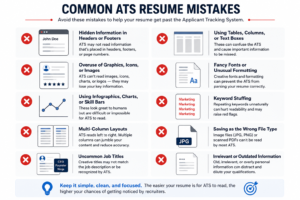
Most people don’t fail the ATS because they lack qualifications. They fail because of small, fixable formatting and language mistakes. Here are the ones that trip up job seekers most often:
- Hiding contact info in headers or footers. Not every ATS can properly read text placed in a Word document’s header or footer, so your name, phone number, and email can vanish entirely if you store them there.
- Using tables, columns, graphics, or icons. These often confuse parsing software, scrambling the order in which your information gets read.
- Getting creative with job titles or section headings. Calling your “Work Experience” section “My Journey” might feel more personal, but unusual headings can confuse the system.
- Keyword stuffing. Cramming in every possible keyword without context reads as spammy to both software and humans, and it rarely improves your ranking the way people assume it will.
- Saving the wrong file type. Some systems still struggle with certain PDF exports, so following the employer’s stated file preference matters.
- Sending the same resume to every job. A generic resume might describe you accurately, but it won’t mirror the specific language of the posting, and that specific language is what the ATS is scoring you against.
The good news? Every single one of these is completely within your control.
Step-by-Step: How to Optimize Your Resume for Applicant Tracking Systems
Now for the part you actually came here for. Here’s a practical, no-fluff process to optimize your resume for applicant tracking systems and dramatically improve your odds of getting seen.
1. Mirror the Job Description’s Language
Keywords are the currency of ATS resume optimization. Pull the job posting apart line by line and highlight the recurring terms, hard skills, tools, certifications, and even soft skills like “cross-functional collaboration” or “stakeholder management.”
This step is where most job seekers do the least work and lose the most points. Here’s how to actually do it well.
Start by treating the job posting like a source document, not a formality. Open it in one window and your resume draft in another. Go line by line and pull out three categories of language:
- Hard skills and tools: specific software, platforms, methodologies, or certifications named directly (e.g., “Salesforce,” “Google Analytics,” “Six Sigma,” “PMP certification”).
- Responsibilities phrased as verbs: the actual actions the employer expects (e.g., “manage vendor relationships,” “conduct quarterly audits,” “lead onboarding for new hires”).
- Soft skills dressed up as requirements: phrases like “strong stakeholder management,” “excellent cross-functional collaboration,” or “proven ability to work in a fast-paced environment.”
Once you’ve highlighted these, the real work is translating your experience into that same vocabulary, without lying about what you did.
Here’s what that looks like in practice:
| Job Posting Says | Weak Resume Line | ATS-Optimized Resume Line |
|---|---|---|
| “Experience with CRM platforms required” | “Kept track of client info in a database” | “Managed client relationships and pipeline tracking using Salesforce CRM” |
| “Bilingual (Spanish/English) preferred” | “Comfortable speaking Spanish” | “Delivered bilingual customer support in Spanish and English” |
| “Strong project management skills” | “Handled multiple projects at once” | “Led cross-functional project management for 5+ concurrent initiatives, delivering all on schedule” |
| “Proficient in data analysis and reporting” | “Made reports for my manager” | “Conducted data analysis and produced weekly performance reports using Excel and Power BI” |
Notice the pattern: the “weak” version isn’t wrong; it just doesn’t speak the ATS’s language, and it undersells you to a human reader too. The optimized version pulls the exact terminology from the posting (“CRM platforms,” “bilingual,” “project management,” “data analysis and reporting”) and drops it directly into a real achievement statement.
A few more practical rules to apply as you go:
- Use the exact phrasing from the posting where it genuinely applies to your experience. If the job says “customer relationship management,” don’t swap in “client handling” just for variety; the ATS may not connect the two.
- Include both the acronym and the spelled-out version of terms (e.g., “Search Engine Optimization (SEO),” “Applicant Tracking System (ATS),” “Customer Relationship Management (CRM)”) so you’re covered no matter which version the system searches for.
- Weave keywords into full sentences and achievement statements; don’t just dump them in a list at the bottom. A skills section that reads “SEO, CRM, Data Analysis, Leadership” with no context scores lower with modern ATS software than the same keywords used naturally within your bullet points.
- Pull secondary language from real employee profiles, too. Beyond the job posting itself, browsing LinkedIn profiles of people who currently hold similar roles at similar companies can surface terminology the posting left out but the ATS may still be scanning for.
- Repeat your most critical keyword two or three times across the document, once in your summary, once in your skills section, and once inside a bullet point, rather than once and never again. Consistency signals relevance; a single mention can read as coincidental.
The goal isn’t to game the system with buzzwords you can’t back up. It’s to describe the work you genuinely did using the same words the employer is already using to think about the role, so the ATS recognizes the match, and the recruiter reading it afterward sees someone who clearly understands the job.
2. Choose a Simple, Single-Column Format
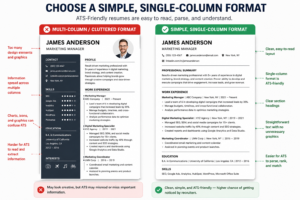
As tempting as a beautifully designed, graphic-heavy resume might look on Canva, it can genuinely work against you.
- Stick to a single-column layout with clear, standard section headings.
- Avoid text boxes, tables, icons, and columns that can scramble how the system reads your content.
- Use a clean, standard font and keep formatting (dates, bullet styles, spacing) consistent throughout.
3. Use Standard Section Headings
This one trips people up constantly because it feels boring, but boring is exactly what you want here.
- Stick to conventional headers like “Work Experience,” “Education,” and “Skills” rather than creative alternatives.
- Keep job titles close to how they’re commonly used in your industry, even if your actual internal title was different.
4. Test Before You Submit
Never send a resume into the void without checking how it actually reads to a machine.
- Copy and paste your resume into a plain text editor. If the content looks jumbled or out of order, an ATS will likely struggle with it too.
- Run your resume through a free ATS scanning tool to check your keyword match rate before applying.
- Read it once more as a human, because at the end of the day, a real person still needs to be persuaded to call you in.
5. Tailor Every Single Application
I know, tailoring every resume feels exhausting when you’re applying to a dozen jobs a week. But this is the single biggest lever you have.
- Adjust your summary and top bullet points to reflect each specific job description.
- Reorder or emphasize the experience that’s most relevant to that particular role.
- Treat your “master resume” as a template you customize, not a document you copy-paste unchanged.
If you want a deeper breakdown of exactly how to mine a job posting for the right terms and weave them in naturally, this ultimate guide to resume keywords is a genuinely useful resource; it walks through pulling keywords from job descriptions, industry buzzwords, and even competitor job postings.
ATS-Friendly vs. ATS-Unfriendly Resume Elements
Sometimes a side-by-side view makes it click faster than a paragraph ever could. Here’s a quick cheat sheet you can reference while formatting your own resume:
| Resume Element | ATS-Friendly Choice | What to Avoid |
|---|---|---|
| Layout | Single-column, linear structure | Multi-column, graphic-heavy templates |
| Contact info | Placed in the main body of the document | Hidden in headers or footers |
| File type | .docx or a text-based PDF (check the posting) | Scanned images or design-heavy PDFs |
| Section headings | “Work Experience,” “Education,” “Skills” | Creative titles like “My Journey” |
| Keywords | Pulled directly from the job description, used in context | Random keyword stuffing with no context |
| Fonts | Simple, standard fonts (Calibri, Arial, Georgia) | Decorative or script fonts |
| Bullet points | Standard round or square bullets | Custom icons, symbols, or emojis |
| Dates | Written out clearly (e.g., “March 2023 – Present”) | Vague or missing employment dates |
Keep this table nearby the next time you’re formatting a resume; it’s a fast gut-check before you hit submit.
Best Practices for Testing Your ATS Resume Optimization
Even after you’ve followed every formatting rule in the book, you shouldn’t submit a resume blind. Testing takes ten minutes and can save you weeks of silence.
- Run a plain-text check. Copy your entire resume into a basic text editor like Notepad. If your bullet points, dates, or job titles come out scrambled or oddly spaced, that’s a strong signal an ATS will misread them too.
- Use a free ATS scanning tool. Several online platforms let you upload your resume alongside a specific job description and generate a match score, along with a list of missing keywords you should consider adding.
- Check your keyword density. Aim for your most important keywords to appear naturally two or three times throughout the document, in your summary, your skills section, and at least one bullet point. Anything beyond that starts to feel forced.
- Proofread manually, not just with spellcheck. Spellcheck won’t catch a wrong job title, a mismatched date range, or a keyword that’s misspelled in a way that still resembles a real word.
- Ask a second set of eyes to review it. A friend, mentor, or career coach can catch inconsistencies you’ve become blind to after staring at the same document for hours.
Think of testing as your final quality check before the resume ever reaches a recruiter’s inbox; it’s the difference between hoping your resume gets through and knowing it will.
Optimizing Your Resume Summary and Skills Section for ATS
Two sections deserve extra attention when you’re working to optimize your resume for applicant tracking systems: your professional summary and your skills section. These are often weighted heavily by parsing software because they’re dense with relevant terminology.
For your summary:
- Open with your job title or target role, mirrored as closely as possible to the posting’s language.
- Include two or three of the most critical keywords from the job description within the first two sentences.
- Keep it to three or four lines, long enough to establish credibility, short enough to stay scannable.
For your skills section:
- List both hard skills (software, certifications, technical tools) and relevant soft skills (leadership, communication, project management).
- Separate skills into short, ATS-readable phrases rather than long, wordy descriptions.
- Update this section for every application; the skills that matter for a marketing coordinator role won’t be identical to the ones that matter for a marketing manager role, even at the same company.
Small as these two sections are, they often carry disproportionate weight in how an ATS scores your overall match, so don’t treat them as an afterthought once the rest of your resume is done.
Don’t Forget the Human on the Other Side
Here’s something that gets lost in all the ATS talk: passing the software is only half the job. Once your resume clears that first filter, a real recruiter still has to be convinced to pick up the phone.
That means your ATS-optimized resume also needs to:
- Tell a clear, compelling story about your career progression.
- Lead with measurable achievements, not just a list of duties.
- Read naturally; stuffing keywords at the expense of readability can actually hurt you once a human is reading it.
The best resumes strike a balance: structured enough for the software, engaging enough for the person. It’s less about “beating” the ATS and more about speaking two languages fluently at once.
Frequently Asked Questions About ATS Resume Optimization
Does every company use an ATS, even small businesses? Not always. Smaller companies and startups sometimes still review applications manually, especially if they receive a modest volume of resumes. But if you’re applying to a mid-size or large organization, it’s safer to assume an ATS is involved somewhere in the process; the formatting habits that help you pass an ATS rarely hurt you with a human reviewer anyway.
Should I use a PDF or a Word document? It depends on the employer. Some systems parse PDFs perfectly well, especially text-based ones created directly from a word processor rather than scanned images. Others still prefer .docx files. When a job posting specifies a format, follow it exactly; when it doesn’t, a clean, text-based PDF is generally a safe default.
Will using an ATS optimization tool guarantee me an interview? No tool can guarantee an interview, and you should be wary of anyone who promises otherwise. What these tools can do is flag obvious gaps, missing keywords, formatting issues, or inconsistent dates, so you’re not sabotaging your own chances before a recruiter even opens the file.
How many keywords are too many? If a sentence sounds unnatural or repetitive when you read it out loud, you’ve likely gone too far. ATS resume optimization should never come at the cost of readability, because a human still has to be persuaded once your resume clears the initial scan.
Should my resume look different for every industry? The core principles of ATS resume optimization stay consistent across industries: simple formatting, mirrored keywords, standard headings, but the specific vocabulary changes significantly. A resume for a software engineering role and one for a customer success role will lean on entirely different technical terms and certifications, so always build your keyword list from the actual posting rather than a generic template.
Final Tips on Optimizing Your Resume for Applicant Tracking Systems
Learning how to optimize your resume for applicant tracking systems isn’t a one-time task you check off and forget. It’s a habit you build into every single application, tailoring your language, cleaning up your formatting, and double-checking that both the software and the human on the other end can actually read what you’ve written.
The job market isn’t getting any less automated, and the applicants who treat ATS resume optimization as a core part of their job search, not an afterthought, are the ones who consistently land more interviews. Take the time to tailor, format cleanly, and test before you hit submit. Your dream job might be one well-optimized resume away.