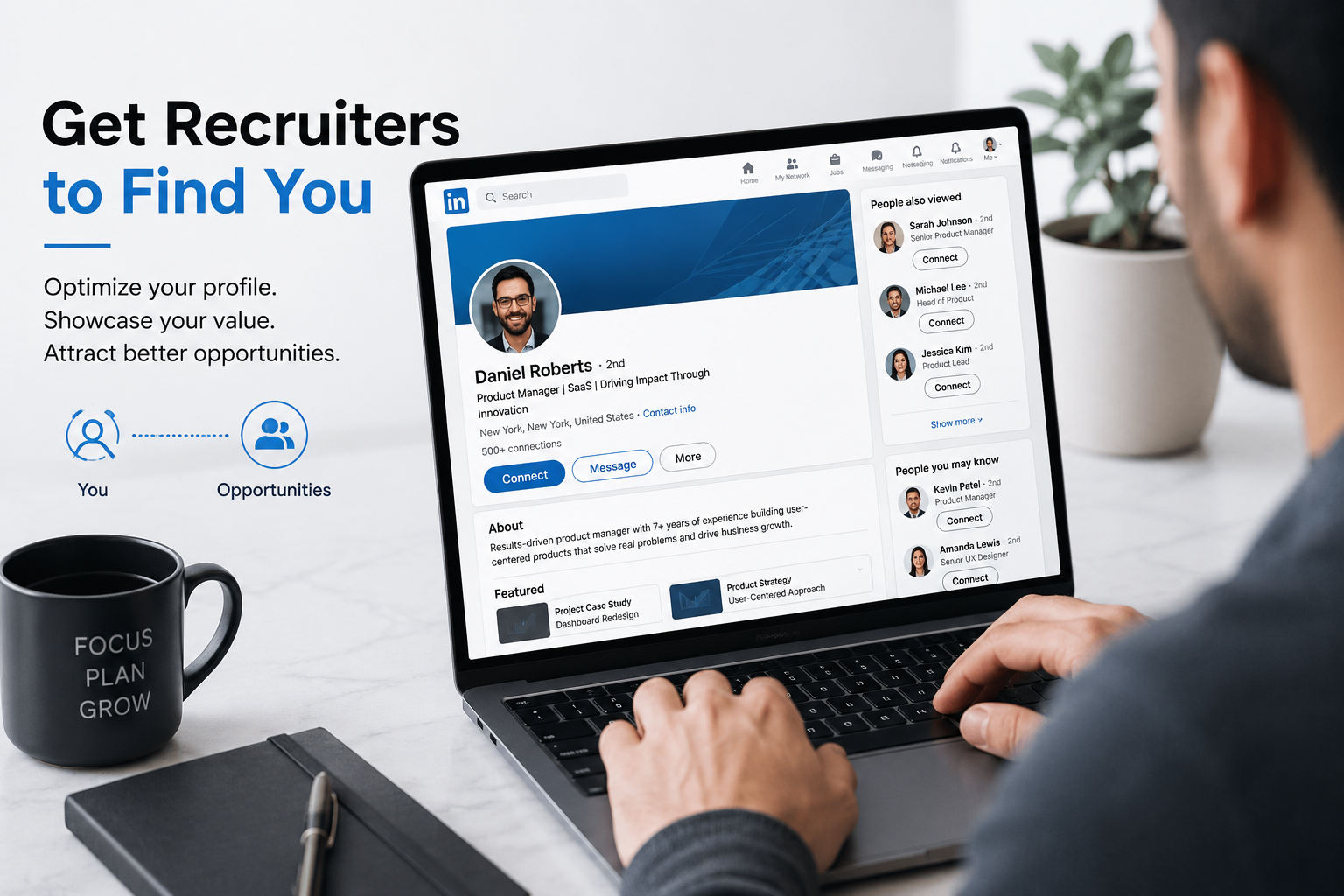
How to Attract Recruiters on LinkedIn and Get More Job Opportunities
Getting noticed by LinkedIn recruiters shouldn’t feel like a mystery, but for most job seekers, it does. You polish your resume, apply to a dozen jobs, and then… silence. Meanwhile, someone with a decent (not even spectacular) LinkedIn profile is fielding three recruiter messages a week without lifting a finger. It feels unfair, but it isn’t luck. It’s strategy.
Recruiters aren’t randomly stumbling onto profiles. They’re running searches, using filters, and scanning specific signals in a matter of seconds. If your profile isn’t built to answer those searches, you’re invisible no matter how qualified you are on paper. And the stakes are real: recruiters who message candidates directly on LinkedIn see far better response rates than cold job board applications, and hiring managers are increasingly open to being contacted first.
The good news? You don’t need a marketing degree or a paid LinkedIn subscription to fix this. You need to understand how recruiters actually search, what makes them stop scrolling, and how to position your profile so it works for you 24/7. That’s exactly what this guide walks you through: how to attract recruiters on LinkedIn and turn your profile into a steady source of job opportunities.
Why You Need to Attract Recruiters on LinkedIn in 2026
LinkedIn isn’t just “another social platform” for professionals anymore; it’s the default recruiting tool. Most recruiters today rely on LinkedIn as their primary channel for sourcing and vetting candidates, and that number keeps climbing every year. Millions of job postings are live on the platform at any given moment, and a huge share of hires- both full-time and remote- trace back to a recruiter search or an InMail, not a job board application.
Here’s the part that matters most to you: candidates who connect directly with recruiters on LinkedIn are significantly more likely to land interviews than those relying on job boards alone, according to research showing candidates who connect directly with recruiters on LinkedIn are 4x more likely to land interviews than those who apply through job boards. That’s not a small edge; that’s the difference between a job search that drags on for months and one that moves. The Interview Guys
If you’re only applying through job portals and never optimizing your profile for search, you’re essentially skipping the fastest lane on the highway. Attracting recruiters isn’t about being flashy; it’s about being findable and credible the moment someone searches for what you offer.
Optimize Your Headline to Attract Recruiters on LinkedIn
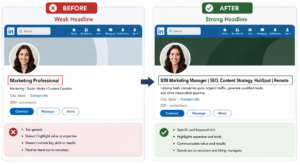
Your headline is prime real estate. It’s the first thing that shows up in search results, in comments, and in connection requests, long before a recruiter clicks into your full profile. Yet most people waste it on vague titles like “Seeking New Opportunities” or just their current job title.
Here’s the problem: recruiters aren’t searching for vague phrases. They’re searching for specific role-and-skill combinations. A well-optimized headline formula looks like this:
- Target role: the job title you actually want
- 2–4 searchable skills or tools: the exact terms recruiters filter by
- A proof point: a credential, scale, or measurable result
- Location or work preference: especially important if you’re targeting remote roles
For example, instead of “Marketing Professional,” try: “B2B Marketing Manager | SEO, Content Strategy, HubSpot | Grew organic traffic 150% | Remote (US).”
This isn’t just cosmetic. In 2026, recruiter search is driven primarily by headline, current title, skills, and location, which means a headline built for search puts you in front of the right recruiters before you ever send a single message. If your headline reads like a job title from ten years ago, you’re leaving visibility on the table.
Craft an About Section That Makes Recruiters Stop Scrolling
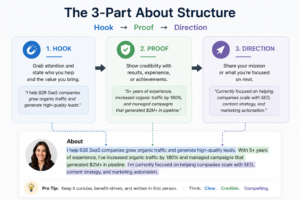
Recruiters skim. Studies suggest they spend about 10 to 20 seconds forming a first impression of your profile, which means your About section can’t ramble; it needs to hook, prove, and direct.
A strong structure looks like this:
- Hook: one sentence stating who you are and what you do (e.g., “I help SaaS companies grow organic traffic through data-driven SEO strategies.”)
- Proof: two or three specific, quantified achievements
- Direction: what you’re looking for next and how someone can reach you
Avoid the trap of writing your About section like a formal cover letter. Recruiters respond to clarity and confidence, not corporate-speak. Numbers do a lot of heavy lifting here too: “Increased sales by 38% in one year” reads far stronger than “Managed sales pipeline.”
Use Keywords Recruiters Actually Search For (Focus Keyword Density Matters)
This is where most job seekers underperform without realizing it. LinkedIn functions like a search engine, and recruiters, especially those using LinkedIn Recruiter, build queries around specific job titles, tools, and certifications. If those exact words don’t appear on your profile, you simply won’t surface in results, even if you’re perfectly qualified.
Where to place keywords for maximum effect:
- Headline: your most important keyword real estate
- Current job title: match it to industry-standard terms recruiters search for
- About section: naturally woven into your first two paragraphs
- Skills section: this is scanned directly by recruiter filters
- Experience bullet points: describe your work using the terms your target roles actually use
One important caution: don’t overdo it. Repeating the same keyword unnaturally, sometimes called keyword stuffing, can actually hurt you, since LinkedIn’s algorithm is built to detect and downrank unnatural patterns. The goal is density with rhythm, not robotic repetition.
Turn On “Open to Work” the Smart Way
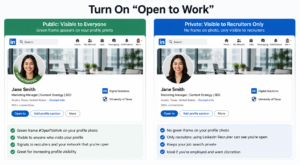
The “Open to Work” feature can be a genuine visibility booster, but you need to use it intentionally. LinkedIn gives you two options: a public green frame around your photo, or a private setting visible only to recruiters using LinkedIn Recruiter.
| Setting | Who Sees It | Best For | Risk |
|---|---|---|---|
| Public “Open to Work” frame | Everyone on LinkedIn, including your network and current employer’s connections | Active job seekers, those between roles, remote job hunters | May signal to your current employer that you’re leaving |
| Private “Recruiters Only” | Only recruiters with a LinkedIn Recruiter seat at companies you’re not currently blocked from | Employed professionals exploring options discreetly | Slightly less visibility than the public frame |
| No “Open to Work” signal | No one | Passive networking, building brand only | Recruiters may skip your profile in “actively looking” filters |
If you’re currently employed and want to avoid awkward conversations, the private setting is the safer play; it still puts you in front of recruiters filtering for candidates, without broadcasting your job search to your entire network.
Build Credibility With Skills, Recommendations, and Activity
Once a recruiter clicks into your profile, your headline and About section have done their job; now it’s about proving you’re legitimate. A few elements carry outsized weight here:
- Skills section: list hard, technical skills over generic soft skills. Recruiters filter by specific capabilities like “Python,” “Salesforce,” or “Financial Modeling,” not vague terms like “team player.”
- Recommendations: a handful of specific, detailed recommendations (especially from former managers) can shortcut a recruiter’s due diligence significantly.
- Recent activity: an account that’s been dormant for two years signals “inactive,” even if you’re actively job hunting. Occasional comments, shares, or posts keep your profile looking alive to both people and the algorithm.
- Profile photo and banner: a clear, professional headshot and a banner that reflects your industry both build instant trust in the two seconds before someone reads a word of your profile.
According to Forbes’ interviews with hiring professionals, recommendations that contain relevant keywords and phrases can improve a profile’s search visibility and increase the chances of appearing in relevant recruiter searches, so even your recommendations section is doing SEO work behind the scenes. Forbes
Engage Actively to Attract Recruiters on LinkedIn Organically
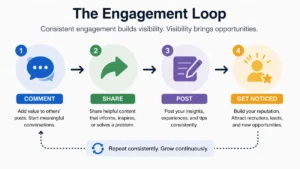
Here’s something a lot of job seekers overlook: LinkedIn rewards activity, not just static profile completeness. Recruiters, especially passive-candidate sourcers, often discover people through content, not just search filters.
Simple ways to stay visible without becoming a “LinkedIn influencer”:
- Comment thoughtfully on posts in your industry a few times a week
- Share an article with a short, genuine opinion attached
- Post occasional career wins, lessons learned, or industry observations
- Follow companies you’d want to work for and engage with their updates
- Join LinkedIn groups relevant to your field and participate in discussions
This kind of light, consistent engagement does two things: it keeps your profile appearing “recently active” (a filter some recruiters use), and it puts your name in front of people in your industry who might refer you or reach out directly.
Common Mistakes That Push Recruiters Away
Even a well-intentioned profile can quietly sabotage itself. Watch out for these:
- A generic headline like “Job Seeker” or just your current title with nothing else
- An empty or copy-pasted About section that reads like a job description, not a personal pitch
- Keyword stuffing, repeating the same term over and over in an unnatural way
- An outdated or unprofessional photo, or worse, no photo at all
- A dead skills section with generic entries and no endorsements
- Long gaps with zero activity, making your profile look abandoned
- Ignoring the About section’s first two lines, which are the only part visible before someone clicks “see more”
Fixing even two or three of these can noticeably change how often you show up in searches and how recruiters perceive you once they land on your page.
Comparing an Optimized Profile vs. an Unoptimized One
Sometimes the difference between “recruiters find me” and “I apply into the void” comes down to a handful of specific choices. Here’s a side-by-side look:
| Profile Element | Unoptimized Profile | Optimized Profile |
|---|---|---|
| Headline | “Marketing Professional” | “B2B Marketing Manager | SEO & Content Strategy | Remote (US)” |
| About Section | Copy-pasted job description | Hook + proof + clear direction |
| Skills | 5 generic entries, no endorsements | 15+ specific hard skills, multiple endorsements |
| Recommendations | 0–1 generic | 3–5 specific, keyword-rich |
| Activity | Dormant for 6+ months | Active weekly (comments, shares, posts) |
| Open to Work | Off or ignored | Set strategically (public or recruiters-only) |
| Search Visibility | Rarely appears in recruiter searches | Regularly surfaces for target roles |
The pattern is clear: specificity beats vagueness at every single stage of the profile.
Make Recruiters Come to You
Attracting recruiters on LinkedIn isn’t about tricking an algorithm; it’s about removing the guesswork for the people whose job is to find candidates like you. When your headline states exactly what you do, your About section proves it, and your activity shows you’re engaged, you stop competing in the crowded inbox of job applications and start showing up in the much shorter list of people recruiters actually reach out to first.
Set aside an hour this week: rewrite your headline, tighten your About section, and check whether your top skills actually match the roles you want. According to career resources built around this exact approach, optimization isn’t about gaming the system; it’s about helping the right people find you faster. That small shift in mindset, from chasing jobs to being found, is often what separates a stalled search from a steady stream of opportunities. Protouch Staffing